
Pages and links
A gamebook is pages and the links between them, so this is the chapter that matters most. Everything after it is decoration on top.
Adding a page
Section titled “Adding a page”Click “+ Add” on the toolbar and choose “Add Page”, or use the “⋯” menu on an element in the tree. You will be asked for a name - this is the internal name, not anything the reader sees, so make it something you will recognise later. Spaces are fine, so Take the lantern works as well as TakeLantern. Punctuation is not - no apostrophes, hyphens or full stops - and a name cannot begin with a number, or use and, or, not, if or in as a word on its own.
Let’s start The Lighthouse. Select Page1, open its Advanced section and rename it to Start, then give it this description:
The boat that brought you is already a smudge on the horizon, and the rainhas started in earnest. The lighthouse stands at the end of a short stonecauseway, dark from top to bottom.
There is a lantern hanging on a post by the jetty.
Then add two pages: TakeLantern and Causeway.
Linking pages together
Section titled “Linking pages together”Links live in the Options list at the bottom of a page’s Page tab. Select Start again, and you will see the two options Quest Viva made for you, pointing at Page2 and Page3. Remove both with the ✕ at the end of each row.
Now add your own. At the bottom of the list there is a row with a drop-down, a box for the link text, and an Add button:
- Choose
TakeLanternfrom the drop-down. - Type “Take the lantern” in the box beside it.
- Click Add.
Do the same for Causeway, with the link text “Leave it and walk up to the lighthouse”.
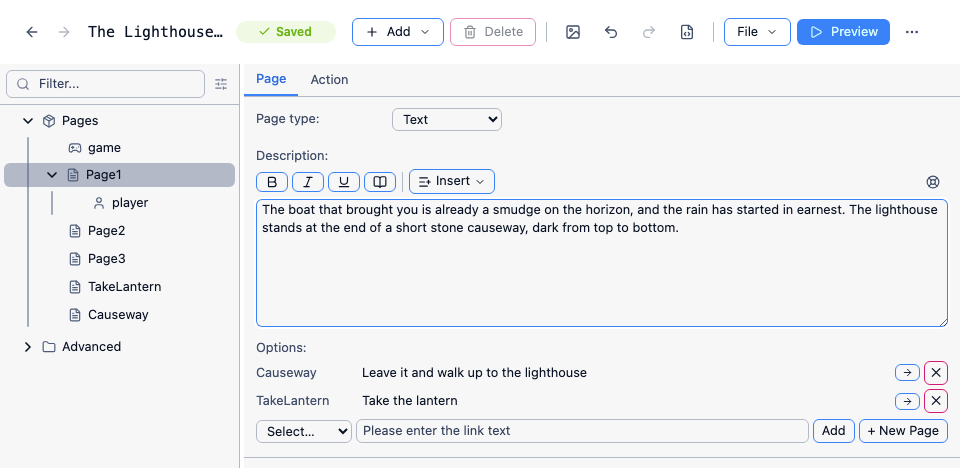
The drop-down only lists pages this page doesn’t already link to, so it gets shorter as you add options, and you can’t accidentally link the same page twice. The → button on a row jumps to that page, which is much quicker than hunting for it in the tree.
The reader sees the options in the order you added them - which in this release is not the order the editor lists them in, since the list is sorted by page name (#2394). Preview the page to see the order the reader will get.
Page2 and Page3 are now orphaned - nothing links to them any more. Delete them with the “⋯” menu beside each one in the tree; leaving pages nothing points at is the easiest way to lose track of where your game has got to.
Where the reader can get to
Section titled “Where the reader can get to”Fill in the two new pages:
TakeLantern - “It is heavier than it looks, and the flame gutters but holds. Whoever left it here was not expecting to be long.” Give it one option, to Causeway, reading “Walk up to the lighthouse”.
Causeway - “Spray comes over the causeway in sheets. By the time you reach the door you are soaked through. The door is shut. There is no bell, and no light in any window.” Add three more pages and link them: Knock (“Knock”), Handle (“Try the handle”) and Back (“Walk round the back”).
Preview, and you can already walk the first few steps of the story by either route.
Notice what the two routes do. Both arrive at the same place, but one of them has picked up a lantern on the way - and later on that will matter. Branches that rejoin like this are the thing that makes a gamebook manageable: you get real choices without the number of pages doubling at every one.
Endings
Section titled “Endings”A page with no options at all is an ending. The reader gets the text and then nothing more - no links, nowhere to go. So write the last paragraph so that it reads like an ending, because the game will not announce one.
The Lighthouse has two. Add them now, with no options on either:
Light - “The lamp catches. The lens takes the flame and throws it out across the water, and somewhere out there a boat that had given up on the night turns towards you.”
Leave - “You walk back down the causeway in the dark, and wait on the jetty until morning. The lighthouse stays dark all night.”
The pages in between
Section titled “The pages in between”Three left, to join the door to the endings. Add Hall, and Stairs, and fill them all in:
- Knock - “You knock, three times, hard. The sound goes nowhere at all. Nothing answers.” Options to
HandleandBack. - Handle - “The handle turns without complaint, and the door swings inward.” One option to
Hall, reading “Go in”. - Back - “Round the back there is nothing but rock, and a window too high to reach. Coming back round, you find the front door standing open. You are fairly sure it was shut.” One option to
Hall. - Hall - “The lantern shows you a round room, a table, and a staircase winding up into the dark.” Options to
Stairs(“Climb the stairs”) andLeave(“Go back out into the rain”). - Stairs - “Ninety-one steps, and the lantern showing you about four of them at a time. At the top, the lamp room. The great lens is intact. The lamp is cold, but the oil is there, and so are the matches.” One option to
Light(“Light the lamp”).
Preview and play it through both ways. It works - but the Hall description talks about a lantern the reader may never have picked up, and they can climb the stairs in the pitch dark. We will fix both in Keeping track.
Two habits worth forming early
Section titled “Two habits worth forming early”Write the link, not the instruction. “Take the lantern” is better than “Click here to take the lantern”, and much better than “Page 2”. The link text is part of the prose.
Let branches rejoin. It is tempting to give every choice its own future. Three real choices that all lead back to the same corridor make a better game than one choice with two entirely separate halves, and much less writing: everything after the join gets written once instead of once per branch.