
Cloak of Darkness
Cloak of Darkness is a tiny game that has been written in almost every interactive fiction system there is. The point of it is comparison: the same handful of requirements, solved in each system’s own way, tells you far more about how a system actually works than any list of features would.
It is also a good way to finish this tutorial. The game you built over the last seventeen chapters was assembled a piece at a time, each piece introducing one feature. This one starts from a specification somebody else wrote, and works out how to build it - which is what writing your own game actually feels like.
We will use code throughout. Everything here can be built by clicking, exactly as before, and if you want to see how a script looks in the editor you can paste the code into a script’s Code View and click “Code view” again to switch back. But the code is shorter to read, and by now you have seen enough of the editor to recognise what it is doing.
The finished game is here: cloak_of_darkness.aslx. It was written by The Pixie, who also wrote the walkthrough this chapter is based on.
The specification
Section titled “The specification”Roger Firth’s specification is deliberately small. His own site has since gone, but the original is preserved in the Internet Archive, and IFWiki lists the implementations. In summary:
- The player starts in the foyer of an opera house. There are doors south and west, and an unusable exit north. Nobody else is around.
- The bar, south of the foyer, is dark. Doing anything there other than going back north warns the player about disturbing things in the dark.
- The cloakroom, west of the foyer, has a small brass hook on the wall.
- The player is wearing a black velvet cloak which, examined, turns out to absorb light. It can be dropped on the cloakroom floor, or better, hung on the hook.
- With the cloak gone, the bar is lit, and a message is scratched in the sawdust on the floor.
- The message reads “You have won” or “You have lost”, depending on how much the player disturbed the room while it was dark.
- Reading the message ends the game.
Not much to it. But there are three separate little systems in there - the hook, the message and the darkness - and they interact, which is where the interest is.
We will do the rooms and objects first, then those three systems, then the look of the thing. Check the game after each section, and don’t only check the thing you just built: try hanging the hook on the cloak, and hanging the cloak up in the foyer, as well as the case you had in mind.
Rooms and objects
Section titled “Rooms and objects”Rename the starting room to “foyer”, and add two more: “cloakroom” and “bar”. Then add three objects: a “cloak” inside the player, a “hook” in the cloakroom, and a “message” in the bar.
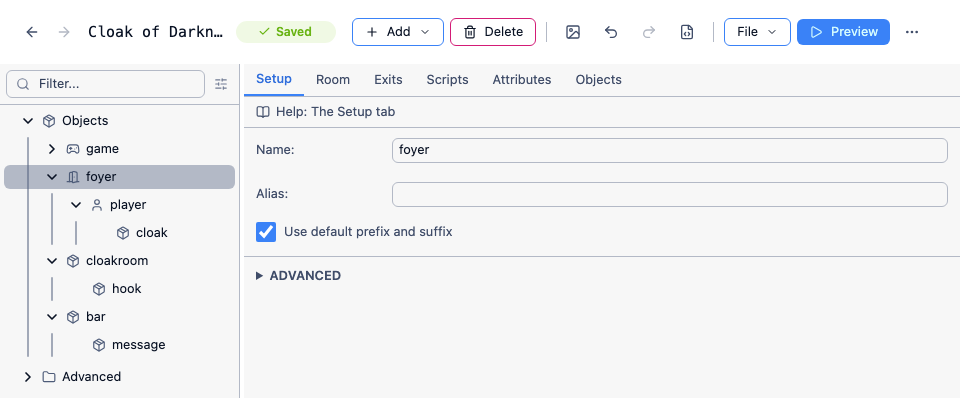
Create the exits between them as you did in the first chapter - foyer south to bar, foyer west to cloakroom, both with the matching exit in the other direction.
The north exit from the foyer is the odd one. It is meant to be a door the player can see and cannot use, so it needs to exist without going anywhere useful. Create it like any other exit, pick any room as its destination, and untick “Also create exit in the other direction”. Then select the exit and tick “Locked” on its Exit tab, with a message of your own - the player will never get through it, so where it claims to lead doesn’t matter.
Give the objects their synonyms on the Object tab: “peg” for the hook; “cape”, “mantle” and “robe” for the cloak; “note” and “writing” for the message. Tick “Object can be taken” on the cloak’s Inventory tab.
Descriptions can wait - most of them depend on the systems we haven’t built yet.
The hook
Section titled “The hook”Go to the hook’s Features tab and tick “Container”, then set its Container tab to Surface. Things sit on a surface in plain view, which is exactly what a hook is. Play the game, walk west and type PUT CLOAK ON HOOK, and it works already.
The player is at least as likely to type HANG UP CLOAK or HANG CLOAK ON HOOK, though. Those need two commands, because one takes a single object and the other takes two.
HANG UP CLOAK
Section titled “HANG UP CLOAK”Add a command with this pattern:
hang up #object#;hang #object#The longer alternative has to come first. The two alternatives in a pattern are tried in the order you write them, and the first one that matches wins - so with them the other way round, HANG UP CLOAK matches hang #object#, Quest Viva goes looking for an object called “up cloak”, and the player is told “I can’t see that.”
When two separate commands both match what the player typed, Quest Viva does compare them, and prefers the one whose pattern has more of the typed text fixed in it rather than left to a #object# placeholder. That does not help here, though, because these are two alternatives inside a single command - once that command has been chosen, the alternatives are just tried in order.
The script works the way most command scripts should: test each way it can fail, say something specific about each one, and do the thing at the end.
if (not object.parent = player) { msg ("You aren't carrying " + object.article + ".")}else if (not player.parent = cloakroom) { msg ("Hang " + object.article + " where, exactly?")}else { object.parent = hook msg ("You hang " + GetDefiniteName(object) + " on the hook.")}object.article gives “it”, “them” or “him” as appropriate, so one message covers every object. GetDefiniteName gives the object’s alias, or its name if it hasn’t got one, with “the” in front where that reads correctly. Both are worth the habit: they keep the writing natural without you having to write a version of each sentence for every object.
HANG CLOAK ON HOOK
Section titled “HANG CLOAK ON HOOK”The second command’s pattern:
hang #object1# on #object2#Why not hang #object1# on hook? Because #object2# lets Quest Viva match the hook’s synonyms too, so HANG CAPE ON PEG works, and if you think of another name for the hook later you only have to add it in one place.
Quest Viva only matches objects that are present, so we know the hook is here if it matched - what we need to check is that object2 really is the hook:
if (not object1.parent = player) { msg ("You aren't carrying " + object1.article + ".")}else if (not object2 = hook) { msg ("You can't hang stuff on " + GetDisplayName(object2) + ".")}else { object1.parent = object2 msg ("You hang " + GetDefiniteName(object1) + " on " + GetDefiniteName(object2) + ".")}In a bigger game you would put a flag on everything that can be hung from, and test that instead of naming the hook - which is why the messages are written to suit any object rather than this one.
A description that changes
Section titled “A description that changes”The cloakroom reads better if the hook is part of the room description than as an object listed underneath it. So put the hook’s Setup tab “Scenery” box on, and write the description as a script on the cloakroom’s Room tab:
s = "The cloakroom is {either CloakHere():dimly|brightly} lit, and is little more than a cupboard. "if (cloak.parent = hook) { s = s + "Your cloak is hung from the only hook."}else if (cloak.parent = this) { s = s + "There is a single hook, which apparently was not good enough for you, to judge from the cloak on the floor."}else { s = s + "There is a single hook, which strikes you as strange for a cloakroom."}msg (s + " The only way out is back to the east.")The general part of the description is built up in a local variable s, the part that depends on the cloak is added to it, and the whole thing is printed at the end. Writing it this way means the parts that never change are written once.
CloakHere() is a function we haven’t written yet - it comes with the darkness, below.
Counting the disturbance
Section titled “Counting the disturbance”The message has to know how much the player blundered about in the dark. That is not simply “how many turns did they spend in the bar”: arriving and leaving again straight away is meant to be harmless, so what counts is consecutive turns.
Give the message two integer attributes, count and disturbed, on its Attributes tab, both starting at 0.
count has to go back to zero when the player leaves, so put this in the bar’s “After leaving the room” script on its Scripts tab:
message.count = 0Then add a turn script inside the bar, so that it only runs while the player is there, with “Enabled when the game begins” ticked:
message.count = message.count + 1if (CloakHere() and message.count > 1) { message.disturbed = message.disturbed + 1 firsttime { msg ("You think it might be a bad idea to disturb things in the dark.") } otherwise { msg ("You can hear {random:scratching:something moving in the dark:rasping breathing}.") }}The turn the player arrives takes count to 1 and does nothing else, so walking in and straight back out costs nothing. Every turn after that counts as a disturbance. The first one gets a warning; the rest get a noise, varied with {random} so the game doesn’t repeat itself. And the whole thing is wrapped in CloakHere(), because none of it should happen once the room is lit - without that test, a player who does everything right and then stops to look around the lit bar gets told they are disturbing things in the dark, and can lose a game they had won.
otherwise is the partner of firsttime: it runs every time except the first.
Now the message itself. Set its “Look at” description to a script:
if (this.disturbed < 3) { msg ("The message in the dust says 'You have won!'")}else { msg ("The message in the dust says 'You have lost!'")}finishSo the player is allowed two disturbances - the one they were warned about, and one more - before they lose. finish ends the game, as in Score and winning.
Players will type READ MESSAGE as often as LOOK AT MESSAGE. Add a “read” verb set to “Run a script”, with a single line:
do (this, "look")That runs the object’s own “look” script, so if you rewrite the description later, READ follows it automatically.
Turns that shouldn’t count
Section titled “Turns that shouldn’t count”Mistyping a command shouldn’t count as disturbing the room, and neither should asking for help. Tick “Show advanced scripts for the game object” on the game’s Features tab, then go to the Advanced Scripts tab it adds, and use the “Unresolved command script”:
msg ("Sorry, I do not understand '" + command + "'.")SuppressTurnscriptscommand holds whatever the player typed. SuppressTurnscripts tells Quest Viva not to run turn scripts this turn, so the turn effectively didn’t happen.
Do the same in a help;? command:
msg ("Just type stuff at the prompt!")SuppressTurnscriptsYou will want something more helpful than that.
The darkness
Section titled “The darkness”Quest Viva has a light and dark feature built in, but it isn’t much use here: it works on rooms and light sources, and our darkness depends on where one particular object is. We only need one question answered - is the cloak in the room with the player? - and we are going to ask it in several places, so it belongs in a function.
The CloakHere function
Section titled “The CloakHere function”Add a function called CloakHere, set its return type to Boolean, and give it one line:
return (cloak.parent = player.parent or cloak.parent.parent = player.parent)Two things make the cloak “here”. Either it is lying in the room, so it has the same parent as the player, or the player is carrying it - or it is on the hook - in which case its parent’s parent is the room the player is in. Either will do, so the two tests are joined with or.
It’s tempting to write that as:
if (cloak.parent = player.parent or cloak.parent.parent = player.parent) { return (true)}else { return (false)}but the thing inside the if is already true or false, so you can simply return it.
Room descriptions
Section titled “Room descriptions”Now the rooms can react. Where only a word or two changes, the text processor is neater than a script. The foyer:
There is something oppressive about the {either CloakHere():dark|dingy} {once:room}{notfirst:foyer}; a presence in the air that almost suffocates you. Very much faded glory, the walls sport posters from productions that ended over twenty years ago. Paint is peeling, dust is everywhere and it smells decidedly musty.{either} takes a condition - here a call to our own function - and the text to use when it is true and false. The second trick is {once:room}{notfirst:foyer}: the game opens with a paragraph about arriving at the opera house, so the first description reads better as “this dark room” and every later one as “the dingy foyer”.
The cloakroom’s description is a script, but the same directive works inside it - that is the first line we wrote earlier.
For the bar the two versions have nothing in common, so a script is clearer than a directive:
if (CloakHere()) { msg ("It is too dark to see anything except the door to the north.")}else { msg ("The bar is dark, and somehow brooding. It is also thick with dust. So much so that someone has scrawled a message in the dust on the floor.")}That is the rule of thumb: {either} when a few words change, a script when whole sentences do.
Hiding the message
Section titled “Hiding the message”The player shouldn’t be able to read the message in the dark. We could test for the cloak inside the message’s own description, but it is better to stop the message being referred to at all - otherwise LOOK AT MESSAGE tells the player there is a message to look at.
There is no way for the player to get rid of the cloak while in the bar, so the state can only change between visits. Put this in the bar’s “After entering the room” script:
message.visible = not CloakHere()An invisible object is not in scope, so in the dark LOOK AT MESSAGE gets “I can’t see that.” - exactly what the player would get for anything else that isn’t there.
That is the specification met. The rest of this chapter is the difference between a game that meets a specification and a game somebody would enjoy.
The look of it
Section titled “The look of it”The puzzle in Cloak of Darkness is working out that the darkness is something you are carrying. An inventory pane listing a cloak gives that away before the player has begun, so this game wants the old school treatment: no hyperlinks (the Display tab), and no panes at all (the Interface tab). Turn off the location bar on the same tab, and turn on the command bar cursor.
Then pick a font and colours to suit. The finished game uses Kavivanar, a handwriting font that is still perfectly legible, in pink on #333 - a very dark grey, which is softer to read against than pure black. Any colour box takes a hex value of three or six digits, beginning with #.
Finally, the Room Descriptions tab controls what a room prints and in what order. Turn off “You are in”, set the list of exits to zero so the exits are described in the prose instead, and swap the numbers so the objects come after the description.
With “You are in” off, the room’s name is printed as a heading - and by default that includes the article, giving “A bar”. Untick “Use default prefix and suffix” on each room’s Setup tab and you get “Bar”, which is what this style wants.
Finishing touches
Section titled “Finishing touches”An opening
Section titled “An opening”A game reads better with a line or two before the first room description. You could put it in the game’s start script, but that script tends to fill up with other things, so it is tidier in the room. The foyer’s Scripts tab has “Before entering the room for the first time”:
msg ("You hurry through the night, keen to get out of the rain. Ahead, you can see the old opera house, a brightly lit beacon of safety.")msg ("Moments later you are pushing though the doors into a foyer...")msg ("")The empty msg ("") leaves a blank line before the room description.
The locked doors
Section titled “The locked doors”The locked north exit’s message is a good place for {once} again, with {i} nested inside it for italics:
You try the doors out of the opera house, but they are locked. {once:{i:How did that happen?} you wonder.}Walls, floor and ceiling
Section titled “Walls, floor and ceiling”Players examine the scenery, and “I can’t see that” is a poor answer when the description has just mentioned peeling paint. These objects want to exist in every room, so rather than copying them into each one, make a room called “everywhere” that the player never visits, and put “walls”, “ceiling” and “floor” in it, all ticked as scenery, with synonyms like “carpet” for the floor.
Each needs a description that knows about the dark:
if (CloakHere() and player.parent = bar) { msg ("It is too dark to see the walls.")}else { msg ("The walls are covered in a faded red and gold wallpaper, that is showing signs of damp.")}Then put them in scope everywhere, using the “Backdrop scope script” on the game’s Advanced Scripts tab:
foreach (o, GetAllChildObjects (everywhere)) { list add (items, o)}That adds every object in “everywhere” to items, the list of objects the parser will consider. Two warnings. You cannot use ListCombine here - the objects have to be added one at a time. And you cannot call a scope function such as ScopeVisibleForRoom from this script, because those functions call this script, and the game will hang.
See Scope for the rest of what this script can do.
SMELL and LISTEN
Section titled “SMELL and LISTEN”The game mentions smells and sounds, so players will try both. They are the same problem, and there are two ways to solve it - worth seeing both.
SMELL the obvious way. A command with the pattern smell;sniff:
switch (player.parent) { case (foyer) { msg ("It smells of damp and neglect in here.") } case (bar) { msg ("There is a musty smell, but behind that, something else, something that reminds you of the zoo, perhaps?") } default { msg ("It smells slightly musty.") }}The default matters: without it, a room you add later and forget about says nothing at all.
LISTEN the better way. A command with the pattern listen:
if (HasString(player.parent, "listen")) { msg (player.parent.listen)}else { msg ("It is quiet as the grave...")}This keeps what a room sounds like on the room, as a string attribute called listen added on its Attributes tab - exactly where its description already lives. The command never has to change as the game grows, and you can paste it into your next game unaltered. The switch version has to be edited every time you add a room.
There is one wrinkle. In the dark bar, LISTEN prints the room’s listen text and then the turn script adds a noise of its own, and the two don’t quite sit together. If that bothers you - and it is fair enough if it doesn’t, since few players will ever type LISTEN - set a flag at the end of the LISTEN command:
player.suppress_background_sounds = trueand test it in the bar’s turn script, around the otherwise message:
if (not GetBoolean(player, "suppress_background_sounds")) {GetBoolean is right here rather than reading the attribute directly, because for most of the game there is no such attribute, and GetBoolean reports a missing attribute as false.
The flag then has to be cleared again, at the end of the turn, after everything that might read it. Turn scripts run in alphabetical order, so add a second turn script outside any room, name it something that sorts late like z_endturn, enable it at the start, and give it one line:
player.suppress_background_sounds = falseWearing the cloak
Section titled “Wearing the cloak”Players will try WEAR CLOAK and REMOVE CLOAK. Quest Viva has a wearable feature built in, but it is the wrong fit here: a worn garment can’t be dropped or put down until it is taken off -
> put cloak on hookYou can't put it there.- and the specification wants the player to be able to hang the cloak up while wearing it. So this game does its own, much simpler version.
Because the built-in feature owns the “wear” and “remove” verbs, ours have to be commands. WEAR:
put #object# on; wear #object#; put on #object#; don #object#if (not HasBoolean(object, "worn")) { msg ("That's not something you can wear.")}else if (object.worn) { msg ("You're already wearing " + object.article + ".")}else { msg ("You put " + object.article + " on.") object.parent = player object.worn = true}Setting object.parent means WEAR CLOAK works when the cloak is on the hook: the player picks it up and puts it on in one move. Set the command’s scope to “inventory” so Quest Viva looks at what the player is carrying first, and then anywhere within reach.
REMOVE is shorter, since anything worn is being carried already:
take #object# off; remove #object#; take off #object#; doff #object#if (not object.worn) { msg ("You're not wearing " + object.article + ".")}else { msg ("You take " + object.article + " off.") object.worn = false}Now make the cloak wearable. You could add a worn attribute on its Attributes tab, but there is a better way. Tick “Run an initialisation script when the game begins” on the cloak’s Features tab, and on the Initialisation script tab:
this.worn = truethis.changedparent => { this.worn = false}The first line starts the game with the cloak on. The second is a change script: changedparent runs whenever the object’s parent attribute changes, which is to say whenever the cloak moves. So dropping it, or hanging it up, takes it off - without which a cloak on a hook would still count as worn, and the player would be wearing something across the room.
this means the object the script belongs to, so this code is not about the cloak at all - paste it into any object and that object becomes wearable too.
Inventory
Section titled “Inventory”The built-in INVENTORY doesn’t know about our worn attribute, so it will say the player is carrying a cloak when they are wearing it. Replace it with a command of our own. This pattern is a regular expression, so that it matches those three words and nothing else:
^i$|^inv$|^inventory$There is exactly one portable object in this game, so this would do:
if (not cloak.parent = player) { msg ("You are not carrying anything.")}else if (cloak.worn) { msg ("You are wearing a cloak.")}else { msg ("You are carrying a cloak.")}But we said at the start we would write this as though the game might grow, so:
carrylist = FilterByNotAttribute(ScopeInventory(), "worn", true)wornlist = FilterByAttribute(ScopeInventory(), "worn", true)if (ListCount(carrylist) = 0) { if (ListCount(wornlist) = 0) { msg ("You are not carrying anything.") } else { msg ("You are wearing " + FormatList(wornlist, ",", "and", "nothing") + ".") }}else { s = "You are carrying " + FormatList(carrylist, ",", "and", "nothing") if (ListCount(wornlist) = 0) { msg (s + ".") } else { msg (s + ", and wearing " + FormatList(wornlist, ",", "and", "nothing") + ".") }}ScopeInventory() is everything the player is carrying; the two filters split it into worn and not worn; FormatList turns a list into “a hat, a scarf and a cloak”. This version never needs touching again, however many things you add.
Testing it
Section titled “Testing it”This is a small game with two endings, which makes it a good candidate for the walkthroughs from Testing your game: one that hangs the cloak up and wins, and one that blunders around in the dark first and loses. Record the winning route, then make a second walkthrough a child of it in the tree and record only the divergence.
Add an assertion to each, so the walkthrough checks the ending rather than just reaching it:
assert:message.disturbed < 3Then work through Before you release - saving the game (which checks your code more thoroughly than anything else does), spellchecking, beta testers, and cover art.
What to take from it
Section titled “What to take from it”Four things in this game are worth stealing for your own:
- Test each way a command can fail, in order, and do the thing last. Every command script here has that shape, and the player gets a specific message rather than a generic one.
- When you ask the same question in several places, make it a function.
CloakHere()appears in five scripts, and there is one place to change if the rules change. - Keep what a room is like on the room. The
listenattribute is the pattern; a command that reads an attribute stays the same size forever, and one with aswitchin it grows with your game. - Use
this, not the object’s name. The cloak’s initialisation script works on any object you paste it into.