
Creating a gamebook
A gamebook is a story the reader moves through by choosing. Each page shows some text and a handful of links, and each link leads to another page. If you have ever read a branching story where every page ends with “turn to 47”, or played anything made with Twine or ChoiceScript, you already know the shape of it.
Quest Viva makes gamebooks as well as text adventures, and they are a different kind of thing to write:
| Text adventure | Gamebook | |
|---|---|---|
| The player | types commands | clicks links |
| You write | rooms, objects and the rules connecting them | pages |
| The world | is simulated - things have state and positions | is whatever the text says |
| Scripting | you will need some | mostly optional |
Neither is the grown-up version of the other. A gamebook is the right choice when the writing is the game, and it is far and away the more popular of the two on textadventures.co.uk. This track covers the whole of it in five short chapters. If you want a text adventure instead, start with the main tutorial.
Creating one
Section titled “Creating one”Open the editor - in your browser or the desktop app - and find the “Create new game” section. Enter a name, choose Gamebook as the game type, pick a language, and click “Create local draft” (or “Save to folder…” if you would rather keep the game file yourself).
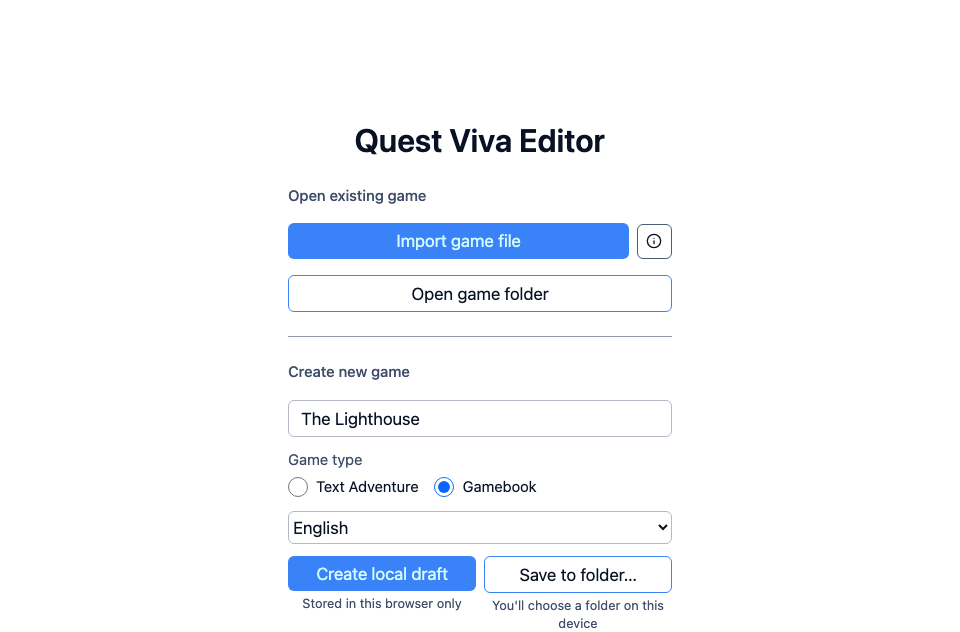
On the left is the tree, which for a gamebook is a list of Pages, plus a “game” entry for settings that apply to the whole gamebook. Quest Viva starts you with three pages, and the “player” sits inside Page1, which is where the story begins.
Click “Preview” at the top right to play it. You can follow the links to pages 2 and 3, and that is as far as it goes. Close the preview to come back.
What a page is
Section titled “What a page is”Select Page1 and you get two tabs, Page and Action. Almost everything happens on the Page tab:
- Page type decides what kind of page this is. It starts as “Text” - a paragraph and some links. The others add a picture, a video, a script, or send the player to another website; they are covered later in this track.
- Description is what the player reads. It has a toolbar for bold, italic and an Insert menu of extras.
- Options is the list of links out of this page, each one a page to go to and the words the player clicks.
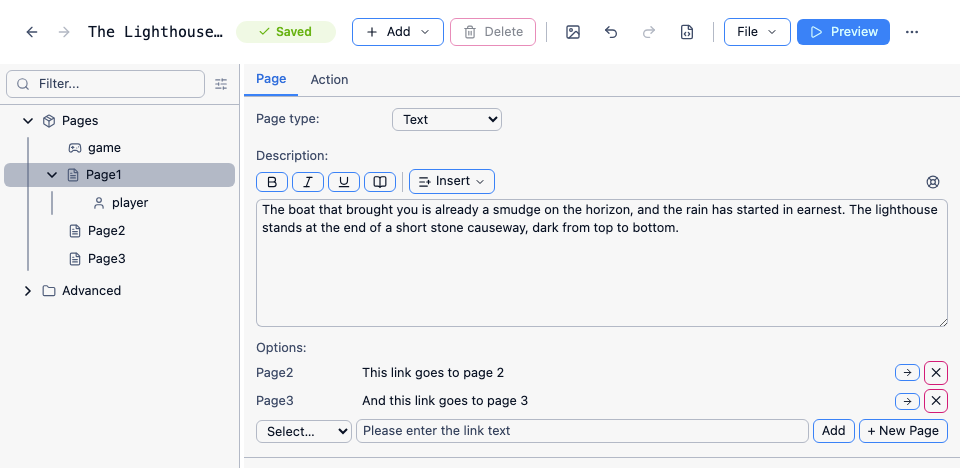
Try it now. Replace Page1’s description with something of your own, change the wording of one of its two options, and preview again.
There is also a Name box, tucked away under Advanced at the bottom. That is the page’s internal name - the one you use when linking to it - and the player never sees it. It is worth renaming pages as you go: Page7 tells you nothing when you come back to the game next week, and LighthouseDoor tells you everything.
What we are going to build
Section titled “What we are going to build”The rest of this track builds a short gamebook called The Lighthouse. You arrive by boat on a stormy night, the lighthouse is dark, and whether the story ends well depends on whether you picked up a lantern on the way in and how boldly you went about things.
It is deliberately small - nine pages - but it uses every part of the editor a gamebook author needs, including pictures, sound, and keeping track of what the reader has done.
The finished thing is here if you want to play it first, or open it in the editor and poke about: lighthouse.aslx.