
Character creation
In some games the player plays a character the author has devised. In others - especially RPG-style games - the player gets to decide who they are. This page shows how to ask the player a few questions when the game starts and set up their character from the answers.
You do this in the start script of the game object, using the same functions described in Asking the player: GetInput() for typed answers, ShowMenu() for a choice from a list, and WaitForKeyPress to pause.
Just a couple of questions
Section titled “Just a couple of questions”Go to the Scripts tab of the game object. The start script is at the top. Set the script to print a message prompting the player, then add a “Set a variable or attribute” action, and pick “player’s typed input” from the list of value templates (this is GetInput() in Code view). Set it up like this:
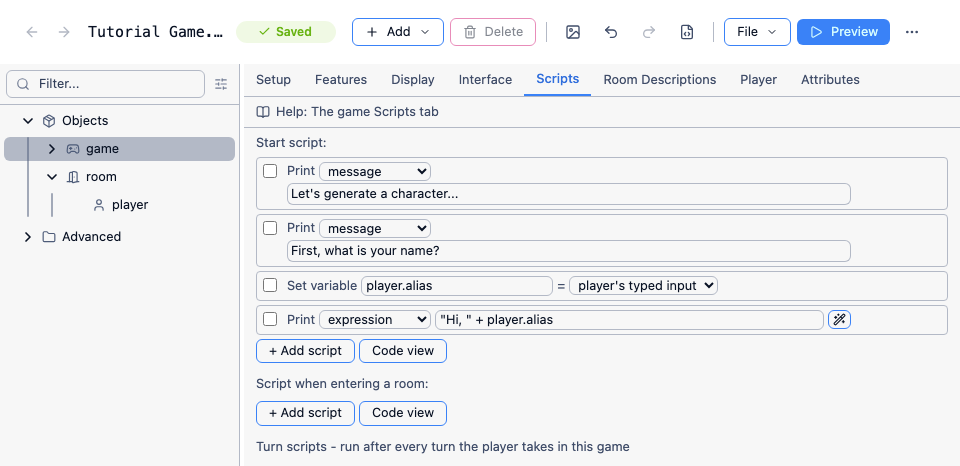
In Code view it looks like this:
msg ("Let's generate a character...")msg ("First, what is your name?")player.alias = GetInput()msg ("Hi, " + player.alias)GetInput() waits until the player types something and presses Enter, then returns what they typed. The script then carries on from the next line. We set the player’s alias rather than name, because an object’s name can’t change during the game.
You can keep adding more questions the same way. When you want to limit the player to a set of choices, use a menu instead - add another “Set a variable or attribute” action and pick “player’s choice from a menu” (ShowMenu in Code view). Like GetInput(), it waits for the player to choose, then carries on with the next line:
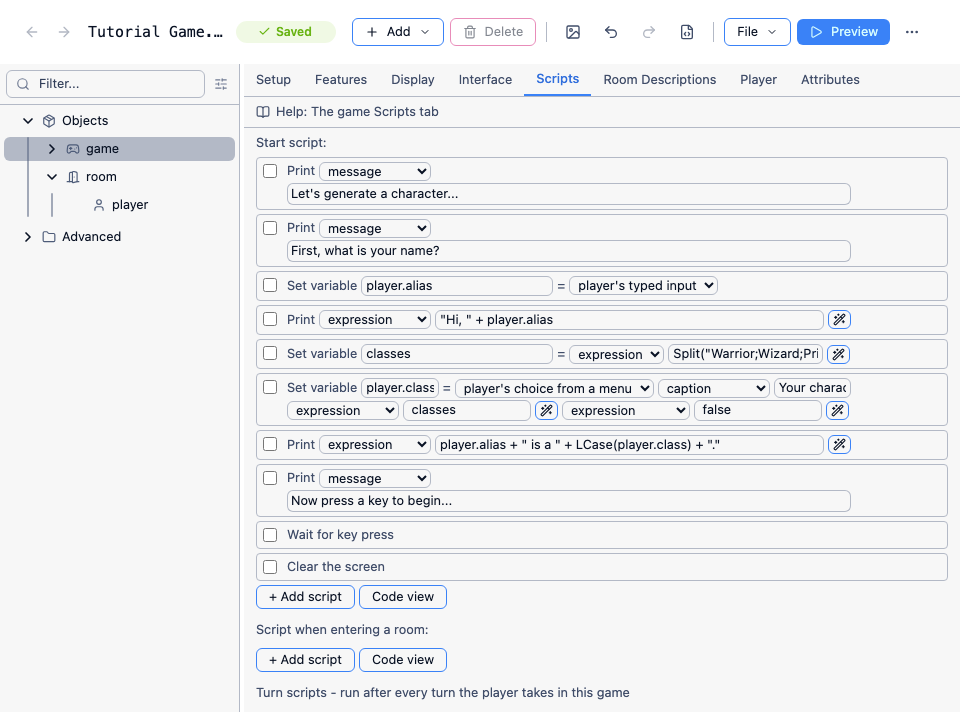
In Code view it looks like this:
msg ("Let's generate a character...")msg ("First, what is your name?")player.alias = GetInput()msg ("Hi, " + player.alias)classes = Split("Warrior;Wizard;Priest;Thief", ";")player.class = ShowMenu("Your character class?", classes, false)msg (player.alias + " is a " + LCase(player.class) + ".")msg ("Now press a key to begin...")WaitForKeyPressClearScreenA menu needs a list of options, and Split is a quick way to make one from a string. Put the list in a variable, like classes here, and pass the variable to ShowMenu. The last parameter says whether the player can ignore the menu, which we don’t want here. WaitForKeyPress pauses until the player presses a key, so they can read the summary before the screen is cleared.
See Asking the player for more about GetInput, ShowMenu and the other ways to ask questions.
Setting up the character
Section titled “Setting up the character”Once you know the answers, you can set up the player. A switch is a tidy way to do something different for each class:
switch (player.class) { case ("Warrior") { player.strength = 4 player.agility = 1 player.magic = 0 sword.parent = player } case ("Wizard") { player.strength = 0 player.agility = 1 player.magic = 4 black_robes.parent = player } case ("Priest") { player.strength = 2 player.agility = 0 player.magic = 2 white_robes.parent = player } case ("Thief") { player.strength = 1 player.agility = 4 player.magic = 0 black_catsuit.parent = player }}Give every class a value for every attribute you plan to use, even if it’s zero. An attribute you never set doesn’t default to zero - it doesn’t exist at all, and doing arithmetic with it causes an error.
Because each question simply waits for its answer, a later question can depend on an earlier one - just ask it inside an if:
if (player.class = "Wizard") { schools = Split("Fire;Ice;Illusion", ";") player.school = ShowMenu("Which school of magic?", schools, false)}If the start script gets long, you can move parts of it into functions - say, CharacterCreationClass - and call them one after another from the start script.
You should consider carefully if you want the player to know what bonuses they will get for each choice. If you decide to do so, they are likely to pick choices that maximise one attribute. On the other hand, if you choose not, they may end up with a mediocre character that is not good at anything.
When the start script runs
Section titled “When the start script runs”The start script runs before the player sees the first room. While it’s waiting for an answer, nothing else happens, and the first room’s description is only printed once the whole script has finished. So you don’t need a separate “creation room” to keep the player busy - start them in the real first room. If the script ends with ClearScreen, as above, the room description is the first thing the player sees once they’ve pressed a key.
The player can’t save the game until the start script has finished, because it’s stopped part-way through. For a few quick questions that doesn’t matter. If you want the player to be able to save in the middle, see Saving while a question is waiting.
The player’s pronouns
Section titled “The player’s pronouns”Don’t change the gender, article or possessive attributes of the player object. While it’s the player, these are “you”, “yourself” and “your”, which is how Quest Viva’s built-in messages come out as “You are in a room” and “You can’t take yourself”. Set player.gender to “she” and the game starts saying “She is in a room”.
If other characters need to refer to the player, ask for their pronouns and store them in external_gender, external_article and external_possessive - the attributes Quest Viva uses for the player object when it’s seen from outside:
pronouns = NewStringDictionary()dictionary add (pronouns, "she", "She/her")dictionary add (pronouns, "he", "He/him")dictionary add (pronouns, "they", "They/them")choice = ShowMenu("Which pronouns should other characters use for you?", pronouns, false)switch (choice) { case ("she") { player.external_gender = "she" player.external_article = "her" player.external_possessive = "her" } case ("he") { player.external_gender = "he" player.external_article = "him" player.external_possessive = "his" } case ("they") { player.external_gender = "they" player.external_article = "them" player.external_possessive = "their" }}You can then use them in text: 'Have you met {player.alias}? I like {player.external_article},' says the guard.
Random stats
Section titled “Random stats”You might be tempted to roll the player’s stats at random, as older tabletop games did. Bear in mind that the player may end up with a character who can barely swing a sword, or one who sweeps past every challenge - and many players will keep restarting until they get a great one. If you do use random stats, consider letting the player choose which score goes to which stat, or re-roll a limited number of times.