
Developers
Quest Viva is free, open source software, hosted on GitHub and licensed under the MIT License. You can read the source, change it, build your own version of it, and use it inside closed source commercial software. You don’t need to ask for permission - you already have it.
This page is about working on Quest Viva itself. To get it building on your own machine, see Building from source.
You might not need the source code
Section titled “You might not need the source code”A lot of what makes a game behave the way it does isn’t C# at all. The command parser, the standard commands and verbs, the rules about which objects the player can reach, the default text the player sees when they try something that doesn’t work - all of that is the Core library, and the Core library is itself written in Quest Viva’s own scripting language, in src/Engine/Core/*.aslx.
That means your game can change almost any of it from inside the editor, with nothing to compile and no fork to keep up to date:
- Overriding functions - replace a single built-in function with your own version, in one game.
- Using libraries - package up a set of changes to share between your games, or with other people.
The other thing you get without touching C# is control over where your finished game lives. WasmPlayer - the player that runs games in the browser, both on textadventures.co.uk and at play.questviva.com - runs entirely in the browser with no server behind it, so a published game is just static files. See Hosting your game for what that makes possible.
Games carry their own copy of the Core library
Section titled “Games carry their own copy of the Core library”When a game is saved or published, the Core library is written into the game file itself, rather than being looked up when the game is played from whichever version of Quest Viva happens to open it. That is deliberate: it’s why a game written for an old version of Quest still plays the way its author intended years later.
Two things follow from this if you’re editing src/Engine/Core/*.aslx:
- A change you make there reaches a game only when that game is next saved in the editor. Games that are already published carry the old code with them, so you can’t repair one - or break one - by changing Core.
- A Core function whose current body does nothing but raise an “obsolete” error usually hasn’t been broken by accident. It has been retired for newly written games, while older games carry on using the working copy they were saved with. Check a function’s history before describing a change to it as a bug fix.
How the pieces fit together
Section titled “How the pieces fit together”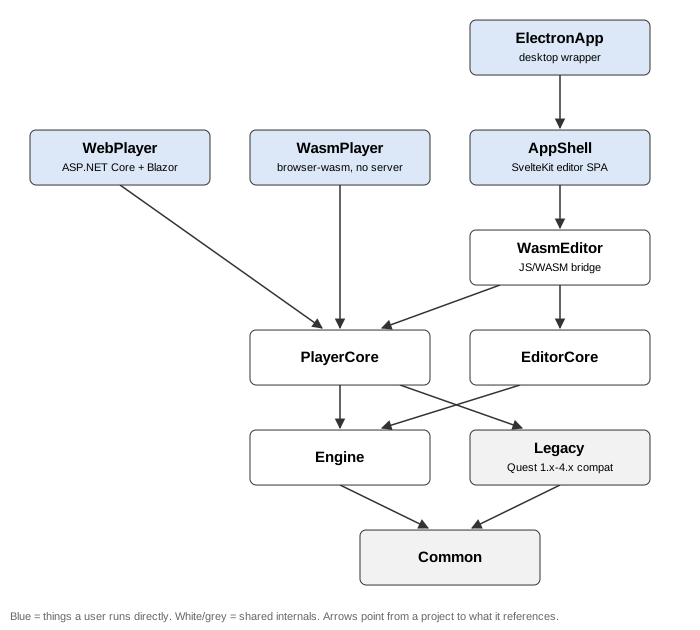
Everything below the players and the editor is C# on .NET 10. Engine is the interpreter - script execution, expression evaluation, game loading, the built-in functions and the Core library. Legacy handles games written for Quest 1.x to 4.x. PlayerCore and EditorCore wrap the engine for playing and for editing.
On top of those:
- WasmPlayer is the player people actually use. It’s the engine compiled to WebAssembly, running the whole game in the browser with no server involved.
- AppShell is the editor’s user interface - a SvelteKit app written in TypeScript, which talks to EditorCore through the WasmEditor bridge across the JavaScript/WebAssembly boundary.
- WebPlayer is a server-side player (ASP.NET Core and Blazor Server), for the cases where you don’t want players to be able to download the game file at all. See WebPlayer.
- ElectronApp wraps AppShell as a desktop app.
The repository’s own README.md and its docs/ folder go further than this page usefully can: docs/appshell-wasm-svelte.md for the editor and the WASM boundary, docs/electron-desktop-app.md for the desktop app, docs/deployment-domains.md for which build is deployed where, and docs/release-channels.md for how releases are cut.
Contributing
Section titled “Contributing”GitHub Issues tracks the features that need implementing and the bugs that need fixing. If there’s an obvious missing feature or a bug, open an issue - check it isn’t a duplicate first. If you’re proposing a major new feature, it’s worth raising it in GitHub Discussions before you write any code.
To contribute a change: fork the repository, make your changes on a branch, and open a pull request against main. Everything goes through a pull request, however small - main is a protected branch. Give the pull request a title in Conventional Commits form (fix: ..., feat: ..., docs: ...), which is enforced, and which becomes the changelog entry once it’s merged. A change that only touches tests belongs under test: rather than fix:, so that the changelog lists only things an author or a player could notice.
Before you open the pull request, run the checks that apply to what you changed - the unit tests, the editor’s lint and type checks, the documentation site’s own checks, and any end-to-end scripts covering the area. Building from source lists them.
The documentation you’re reading is in the same repository, under site/, and every page has an “Edit page” link at the bottom that takes you straight to it on GitHub. Corrections are as welcome as code.
Questions about how any of this works are welcome in GitHub Discussions or on Discord.